
VidMate Free Video Downloader & MP3 Converter For Android 2026
VidMate lets Android users download and manage supported videos and music for offline use. Learn about features, APK installation, updates, safety, formats, and common issues.
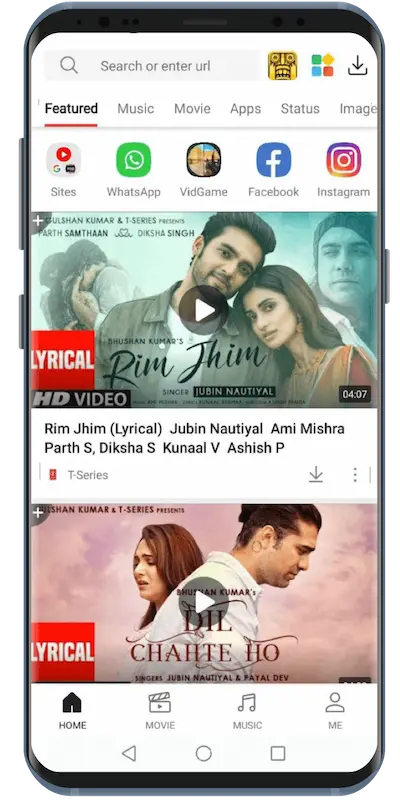
VidMate is a multimedia application made for Android users who want an easier way to save videos, music, images, and other supported media on their phones. Instead of depending on several different tools for different websites, the app brings search, playback, downloading, and basic file management into one interface.
Many people use online platforms every day for entertainment, music, short videos, educational clips, and other media. Streaming works well when the internet connection is stable, but it is not always convenient when traveling or using limited mobile data. VidMate App gives users an option to save supported content locally so they can access it later without repeatedly loading the same file.
The app focuses mainly on simple navigation. Users can search for media, choose available quality options, select a file format, and start downloading. The exact features and supported services can change between versions, so users should always check the current release before installing it.
What is VidMate?
VidMate is an Android-based media downloading application. It combines a browser-style search system with a download manager and media player. This allows users to search for supported content and manage downloads without switching between several apps. The application is commonly used for downloading videos and audio files where downloading is allowed by the source or content owner. It can also be useful for saving personal media, public-domain material, creator-approved downloads, and content made available for offline use.
Unlike a basic downloader that only accepts a direct URL, VidMate App includes more tools inside the application. Depending on the version, users may get search options, playback controls, a download queue, format selection, background downloading, and media organization features. Because it is mainly designed for Android devices, its interface is usually optimized for touch controls. Menus are kept simple, and most common actions can be completed in a few taps.
How VidMate Works
The working process is straightforward. After opening the app, users can search for supported media or open a supported source through the built-in browsing area. When downloadable media is detected, the app normally shows available formats or quality choices. The user can then select the preferred option and start the download. Progress can be viewed through the download manager. Once the file is saved, it can usually be opened through the app or another compatible media player installed on the device.
Some files may offer several versions. A video, for example, may be available in a smaller size for users who want to save storage or in higher quality for people who prefer better picture clarity. Audio may also be available separately where supported. Availability depends on the website, content permissions, device compatibility, and application version. Not every online video can or should be downloaded. Users should follow the terms of the platform and respect the rights of creators.
Main Features of VidMate App
The VidMate App includes several functions that make media management easier on Android. Instead of focusing on only one type of file, the app is designed to handle different kinds of downloadable media from supported sources.
Simple Video Downloading
Video downloading is one of the main functions of the application. When a supported video is detected, users can choose from the options provided by the app and save the file to their device. This can be useful when users need offline access to their own videos, freely available educational material, creator-approved content, or other media that can legally be saved.
The downloading process is designed to be simple. Users do not normally need to deal with complicated file paths or technical settings before starting a basic download.
Different Video Quality Options
Not every user wants the largest file. A higher-resolution video may look better, but it can also use more mobile data and storage. VidMate can provide different quality choices when the source makes them available. A user with limited storage may select a smaller version, while someone watching on a larger screen may prefer a clearer file.
Available resolutions vary with the original upload and source platform. Selecting the right option helps balance quality, file size, storage space, and download time.
Music and Audio Downloads
The app is also useful for audio content. When audio downloading is supported, users can save music or other audio files for offline listening. This can be convenient for podcasts, personal recordings, royalty-free music, lectures, or media that the publisher allows users to download. Audio files normally take less storage than full video files, making them useful for people who only need the sound portion of supported content.
Video to Audio Option
Some supported media can be saved in an audio-focused format rather than downloading the complete video. This feature is useful when the visual part is not important. For example, a user may only need the audio from a lecture, an authorized music video, an interview, or another permitted source.
Saving audio instead of the complete video can also reduce the amount of storage used on the phone.
Built-In Search
Searching directly inside the application makes the process easier for users who do not want to copy and paste links repeatedly. The built-in search or browsing feature can be used to find supported media. Users can open content, review the available options, and begin downloading from the same interface.
The exact layout may be different in each release, but the main goal remains to reduce unnecessary steps.
Download Manager
A good download manager becomes important when several files are being saved. VidMate provides a section where users can view active, completed, paused, or failed downloads. This makes it easier to see which files have finished and which ones still require attention.
Large downloads may take longer on slow networks, so being able to check their status can be useful.
Background Downloading
Users do not always want to keep the application open while a file downloads. On supported devices and Android versions, downloads may continue while the user performs another task. Android battery settings, background restrictions, or data-saving modes can still affect this behavior.
If a download stops when the app is minimized, users can check battery optimization and background data permissions.
Multiple File Formats
Different devices and media players support different formats. VidMate can provide more than one format when the original source offers those choices. Common multimedia formats may include video and audio options. However, exact format support should be checked inside the current version because availability can change depending on the source file.
Choosing a widely supported format is usually better when users want to transfer the downloaded file to another phone, television, computer, or media player.
Built-In Media Playback
After downloading a file, users may want to check it without opening another application. Some versions provide built-in playback features that make it possible to open downloaded media directly. This helps users confirm that a file was downloaded correctly. Users can still choose another installed player if they prefer different playback controls or codec support.
Media File Management
As more files are downloaded, keeping them organized becomes important. VidMate can make it easier to locate downloaded media from within the app. Depending on the Android version, users may also find the files through the phone’s file manager. Users should occasionally remove files they no longer need. This can prevent downloaded media from taking too much internal storage.
VidMate APK for Android
VidMate APK is the Android installation package used to install the application manually on compatible devices. An APK works in a similar way to an installer file on a computer, but it is specifically made for the Android operating system. When an application is distributed as an APK, users download the installation file and open it manually. Android may ask for permission before allowing installation from a browser or file manager.
This method is different from installing an app directly through an app marketplace. Users should therefore pay more attention to the source of the file and the permissions requested during installation. The exact file size, version number, and Android requirement can change with new releases. Instead of relying on old specifications, users should check the information provided with the current package before installing it.
VidMate Download for Android
The VidMate Download process starts with finding a compatible package from a trusted source. Before downloading, users should compare the version, file information, and Android requirements with their device. After the file finishes downloading, it will normally appear in the browser’s Downloads section or the phone’s Downloads folder.
Android may prevent installation from an external source until the user gives temporary permission to the browser or file manager being used. The wording of this setting differs between Android versions. Once permission is enabled, the APK can be opened and installed. After installation is complete, users can disable that installation permission again if they do not need it. It is better to avoid random modified packages from unknown sources because they may contain changes that are not part of the original application.
VidMate APK Download and Installation
Before starting a VidMate APK Download, users should make sure that the file comes from a source they trust. Check the version number, Android compatibility, file size, and package details before opening the installer. Once the APK has been downloaded, open it from the Downloads folder and follow the Android installation screen.
If Android displays a security warning, read it carefully instead of simply continuing. The phone may be warning that the file came from outside the usual app marketplace. After the installation finishes, open the app and review the permissions it requests. Only allow permissions that are necessary for features you plan to use.
For example, storage or media access may be required to save downloaded files. Permission names can be different on newer Android releases because Android has changed how applications access photos, videos, audio, and files.
VidMate App Download
A VidMate App Download gives Android users access to the application’s downloading, playback, and media management tools. Before downloading the app, users should confirm that their device meets the current Android requirements. Users with older phones should pay particular attention to compatibility. Installing a build made for a newer Android version may result in installation errors or unstable performance.
It is also useful to keep some free storage available before downloading and installing the application. Extra space may be needed for temporary files and future media downloads.
How to Use VidMate
Using the application does not require complicated steps. Open VidMate and search for the content you want to access. You can also browse supported sources through the available interface. When downloadable media is detected, open the download options. Select the available format or quality that suits your needs.
Before choosing the highest resolution, check the estimated file size when it is shown. Higher quality usually requires more storage and may take longer to download. Start the download and open the download manager to check its progress. After completion, the file can be accessed from the application’s download area or your device storage. Always make sure that you have permission to save or reuse the media you download.
Choosing the Right Video Quality
Selecting video quality is not only about choosing the highest number. For a small phone screen, a medium-quality file may already look clear while taking much less storage. Higher-resolution videos make more sense when users have enough storage or plan to watch the content on a larger screen.
Network speed is also important. A large file downloaded over slow mobile data may take considerably longer. Before starting several large downloads, check the available storage space on the device. Android can become slower or show storage warnings when internal memory becomes nearly full.
Storage and File Size
Media files can use storage quickly, especially when users regularly save videos. A few high-quality videos may occupy much more space than dozens of smaller audio files. For that reason, users should monitor their Downloads folder and remove unnecessary content.
If the phone supports expandable storage and the application allows selecting a download location, files may be saved to another storage area. Support depends on the device and Android version. Users should also remember that clearing application data can affect settings or locally stored information. Important downloaded files should be backed up before performing major app cleanup or reinstalling Android.
VidMate Latest Version
The VidMate Latest Version may include bug fixes, compatibility improvements, interface changes, and newly supported features. Users often prefer newer releases because they can work better with recent Android devices and updated media sources. However, the newest release is not automatically the best option for every phone. Older devices may perform better with a compatible version designed for their Android generation.
Before updating, check the Android requirement, package information, file size, and available storage. If the application was installed manually through an APK, future updates may also need to be installed manually. Users should check for a newer release from a trusted source.
Normally, installing a newer compatible package over the existing version can preserve app data, but this is not guaranteed for every build. Important downloads should therefore be kept safely before updating.
VidMate for Android
VidMate for Android is designed mainly for smartphones and tablets running Google’s mobile operating system. Its interface is optimized for touchscreens and mobile media use. Compatibility can vary between Android versions. Newer phones may use different file permission systems than older models, while some older devices may not support the newest build.
Before installation, users should check the required Android version and make sure enough storage is available. The app may also behave differently depending on the phone brand because manufacturers sometimes apply their own battery-saving and background activity restrictions.
VidMate and Internet Connection
The app needs an internet connection to search online sources and download new content. The speed of a download depends on several factors, including the user’s network connection, the source server, file size, network congestion, and restrictions placed by the source platform.
An application cannot create internet speed that the network itself does not provide. If the connection is unstable, pausing other downloads or switching between mobile data and Wi-Fi may help. Once a supported file has been completely saved to the device, users can normally play the local file without an active internet connection.
Is VidMate Free?
VidMate is commonly distributed as a free Android application. However, features, advertising, or other parts of the service may differ between versions and distribution sources. Users should check the current app information instead of assuming that every package offers exactly the same experience. Be cautious if an unknown website asks for unusual payments, account information, or unnecessary personal details before providing an APK.
Is VidMate Safe?
Safety depends heavily on where the APK comes from and whether the package has been changed by a third party. Android applications downloaded outside an official marketplace require more care because the user is responsible for deciding whether the file source is trustworthy.
Before installation, check the domain, file details, version information, and permissions. Keeping Android security features enabled can also help detect suspicious files. A downloader should not require unrelated sensitive permissions without a clear reason. If an app unexpectedly asks for contacts, SMS access, phone calls, or other permissions unrelated to its purpose, review those requests carefully.
Using the original or verified package is safer than downloading randomly modified editions from unknown websites.
VidMate Permissions
Android permissions control what an application can access on the device. A media downloader may need permission related to files, photos, videos, music, notifications, or network access. The exact permissions depend on the Android version and the app’s features.
Users should review permissions after installation. Android settings allow permissions to be changed later if a feature does not need continuous access. Newer Android releases provide more detailed control than older versions, so the permission screen may look different from tutorials created several years ago.
Common Download Problems
Sometimes a file may not start downloading even when the application itself is working. The first thing to check is the internet connection. Try loading another website or online service to confirm that the network is active.
Next, check whether the content source is still available. Websites regularly change their media systems, and a download option that worked previously may temporarily stop working. Storage is another common issue. A phone with very little free space may fail to complete larger downloads.
Battery optimization and background restrictions can also interrupt downloads when the app is minimized. Allowing normal background activity may solve this issue on some Android devices. If only one particular file fails, the issue may be related to that source rather than the complete application.
Why a Download May Stop
Interrupted downloads can happen for many reasons. A weak Wi-Fi signal, switching between mobile networks, low device storage, server problems, or Android background restrictions may stop a transfer before it finishes. When this happens, first check whether the download manager provides a retry or resume option.
If the same file repeatedly fails, delete the incomplete file and start again. Restarting the app or the phone can also clear temporary network or storage problems. Avoid using aggressive battery-saving modes while downloading very large files because some phones automatically suspend background apps.
VidMate for PC
VidMate is primarily made for Android. Users who want to access Android applications on a Windows computer sometimes use an Android emulator. An emulator creates an Android environment inside Windows where compatible APK files can be installed. Performance depends on the computer’s processor, RAM, storage, graphics support, and the emulator being used. Low-end computers may experience slower performance.
Because there may not be a native Windows edition with exactly the same functions, users should be careful when websites advertise unrelated .exe files using the VidMate name.
Can VidMate Work on iPhone?
An Android APK cannot be installed directly on an iPhone or iPad. Android uses APK packages, while Apple’s operating systems use a different application system. Renaming an APK or transferring it to an iPhone does not make it compatible.
iOS users need a version specifically designed for Apple devices or another legal downloading method supported by the content provider. Websites claiming that an Android APK can be directly installed on iOS without any compatible application should be treated carefully.
Pros and Cons of VidMate
Pros
- Supports video and audio downloads from compatible sources.
- Offers different quality options where available.
- Can save media for offline use.
- Includes a built-in download manager.
- Supports background downloading on compatible devices.
- Provides simple media search and file management.
- VidMate App is mainly designed for Android users.
- Some versions support audio-only downloads and media playback.
Cons
- VidMate APK usually requires manual installation.
- It may not be available through every official app store.
- Download support can stop if a source website changes its system.
- High-quality videos can use a lot of storage space.
- Some downloads may fail because of network or server issues.
- Android permissions and battery settings can affect background downloads.
- VidMate for Android does not mean the same APK can work directly on iPhone.
- Safety can depend on where the APK file is downloaded from.
Responsible Use
A downloading tool itself does not give permission to copy every piece of content available online. Videos, films, music, courses, broadcasts, and other media may be protected by copyright or platform terms.
Users should download content only when they own it, have permission from the creator, the platform provides a download option, or the material is otherwise legally available for offline use. Downloaded media should not be reuploaded, sold, or distributed without the necessary rights. Following these basic rules helps users benefit from offline media features while respecting creators and online platforms.
Frequently Asked Questions
What is VidMate used for?
VidMate is mainly used for finding, downloading, playing, and managing supported video and audio files on Android devices. Available functions depend on the app version and source platform.
What is VidMate APK?
VidMate APK is an Android installation package used to install the app manually on a compatible Android smartphone or tablet.
How does VidMate Download work?
A VidMate Download starts when users select supported media, choose an available quality or format, and save the file to their device.
Where can I get VidMate APK Download?
A VidMate APK Download should only be obtained from a source you trust. Always check package details, compatibility, and permissions before installation.
What is VidMate App Download?
VidMate App Download refers to downloading the Android application package so the app can be installed and used on a compatible device.
What is the VidMate Latest Version?
The VidMate Latest Version is the newest available build of the application. Version numbers and supported Android requirements can change over time.
Is VidMate for Android available?
Yes. VidMate for Android is primarily designed for Android smartphones and tablets. Compatibility depends on the Android version and current app release.
Can I download videos in HD?
Higher-quality options may be available when the original source provides them. The available resolution varies with the specific media file and platform.
Can I save only audio?
Some supported media may provide an audio-only option. Availability depends on the file, source, and current version of the app.
Does VidMate work without internet?
An internet connection is needed to search for and download new online content. Files that have already been completely saved to the device can normally be played offline.
Why is VidMate not installing?
The APK may be incompatible with the Android version, damaged during downloading, blocked by installation permissions, or conflicting with an existing package. Check the file and device requirements before trying again.
Why is my download not starting?
Check the internet connection, available storage, app permissions, source availability, and battery restrictions. If other files download normally, the issue may be limited to that particular source.
Can I install VidMate on Windows?
Since the app is primarily designed for Android, Windows users may need a compatible Android emulator. Avoid unknown Windows files that only use the VidMate name.
Is VidMate available for iOS?
An Android APK cannot run directly on iOS. iPhone users need software specifically made for Apple’s operating system or another supported method.
How do I update VidMate?
Download a newer compatible package from a source you trust and follow the installation process. Back up important files before major updates or reinstalls.
Conclusion
VidMate offers Android users a practical way to manage supported video, audio, and other media downloads from one application. Its combination of search, downloading, quality selection, playback, and file management makes it useful for people who regularly keep permitted content for offline access. The experience still depends on the user’s device, internet connection, source platform, application version, and available storage. Choosing the correct file quality and keeping enough free space can prevent many common problems.
Users should also pay attention to VidMate APK safety. Download files from sources they trust, review permissions, keep Android security features active, and avoid suspicious modified packages. Most importantly, use downloading features responsibly. Save media that you have the right to access offline and respect the copyright rules and terms of each platform.